Start with your own benefit
A certification benefit can reduce an official exam fee, but it is not an automatic discount on every future certification. Google’s current help page describes a 50% benefit for renewal. A learner-provided portal example also says “next exam or renewal.” Check the terms attached to your own benefit before budgeting for a different certification.
1. Sign in and open My Benefits
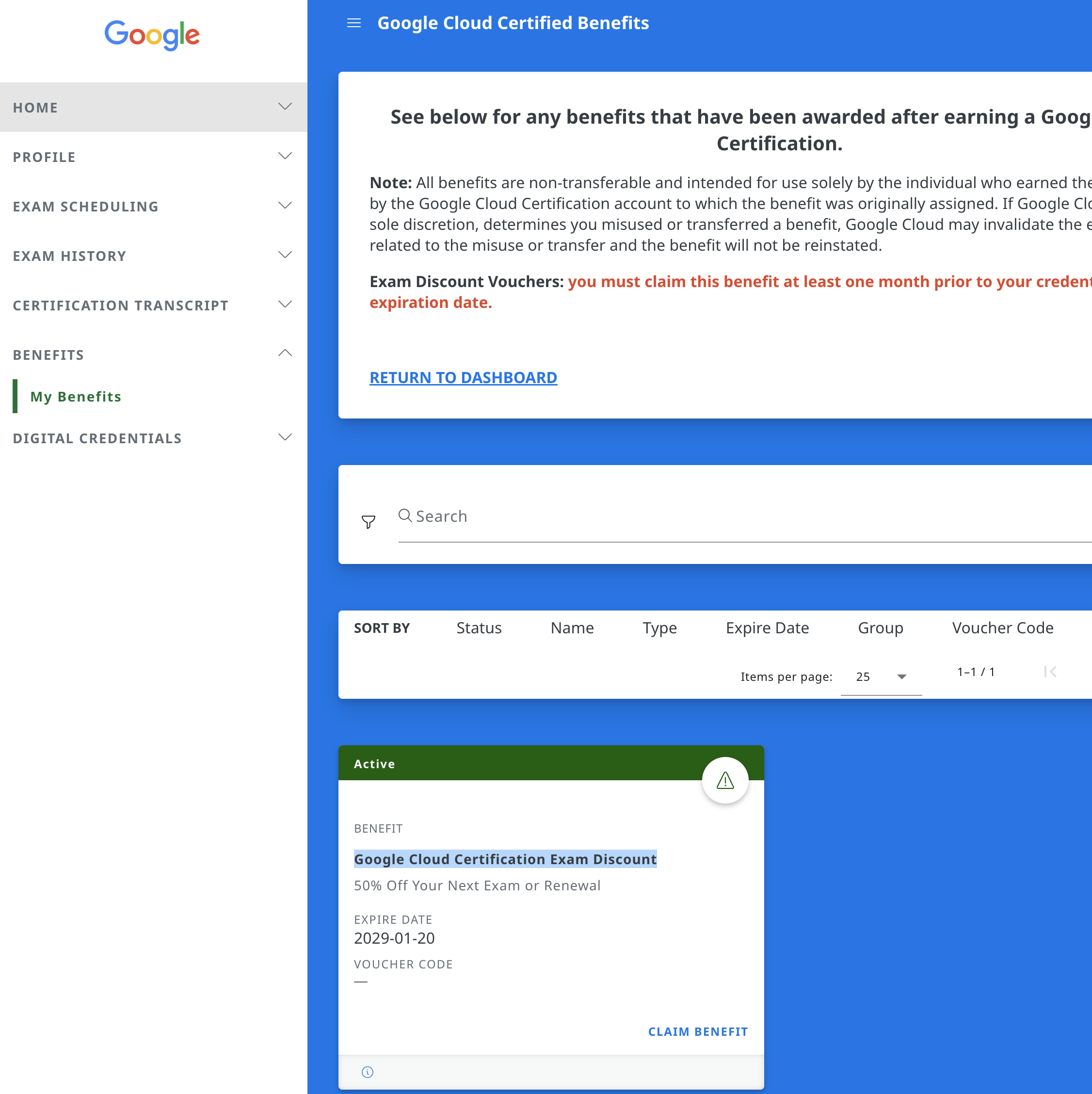
Open your Google Cloud certification account through the official certification website. Use the account associated with the certification you earned. In the portal layout shown in our learner example, open Benefits, then My Benefits. The interface may change; look for your awarded certification benefits.
2. Find the exam discount and claim it
Look for the Google Cloud Certification Exam Discount benefit. Check its status and expiration date, then select Claim Benefit if offered. The example portal warns learners to claim an exam discount at least one month before their credential expires. Follow the deadline shown in your own account; someone else’s expiration date does not apply to you.
3. Check eligibility before booking
Read which exams, languages, regions and account details the voucher covers. A discount for renewal may not cover a new certification. Keep the code private and do not share or sell it. If you are unsure which booking qualifies, ask Google certification support before paying.
4. Apply the code and inspect the total
Select the intended exam through the official registration flow and enter the voucher at checkout. Confirm the discount appears before completing payment. If the code is rejected, check the selected exam and language, expiration and accidental spaces. Do not assume a later refund will fix an incorrect booking.
Plan a sequence without depending on another voucher
Choose your next certification because it fits your work. Budget its full price first, then add a discount only after confirming eligibility. For illustration, half of a $99 standard exam fee is $49.50 before tax; that calculation is not an offer or proof that your voucher applies. Compare the full fee and any confirmed discount in your study budget; do not assume every pass generates another usable voucher.
Keep three kinds of savings separate
Google’s voucher reduces an eligible official exam fee. Employer reimbursement follows your employer’s policy. GCP Practice Exams’s self-reported pass reward discounts another practice pack; it does not pay for an official exam. Dev purchases and offers use test payments only.
Sources & further reading
- Google: vouchers and discounts ↗
- Official certification catalog and registration entry points ↗
- Cloud Digital Leader standard exam fee ↗
Official sources establish exam scope and policies. Study schedules and exercises are our editorial suggestions. Check current provider information before booking.
Explore the certification catalog →
Download the free 25-page preparation workbook ↓
Choose one idea to try next.
Start with the free 20-question Cloud Digital Leader practice exam, or explore the certification that fits your goal.